
- FL Studio users who want a VST3 log drum instrument.
- Producers who write bounce-driven piano roll basslines.
- Beatmakers who want log drum presets with quick shaping controls.
Jebjosh Plugins FL Studio guide
Amapiano log drum VST for FL Studio.
FL Studio producers can use Amapiano Log Drum Generator as a focused VST3 instrument for writing log drum patterns quickly.
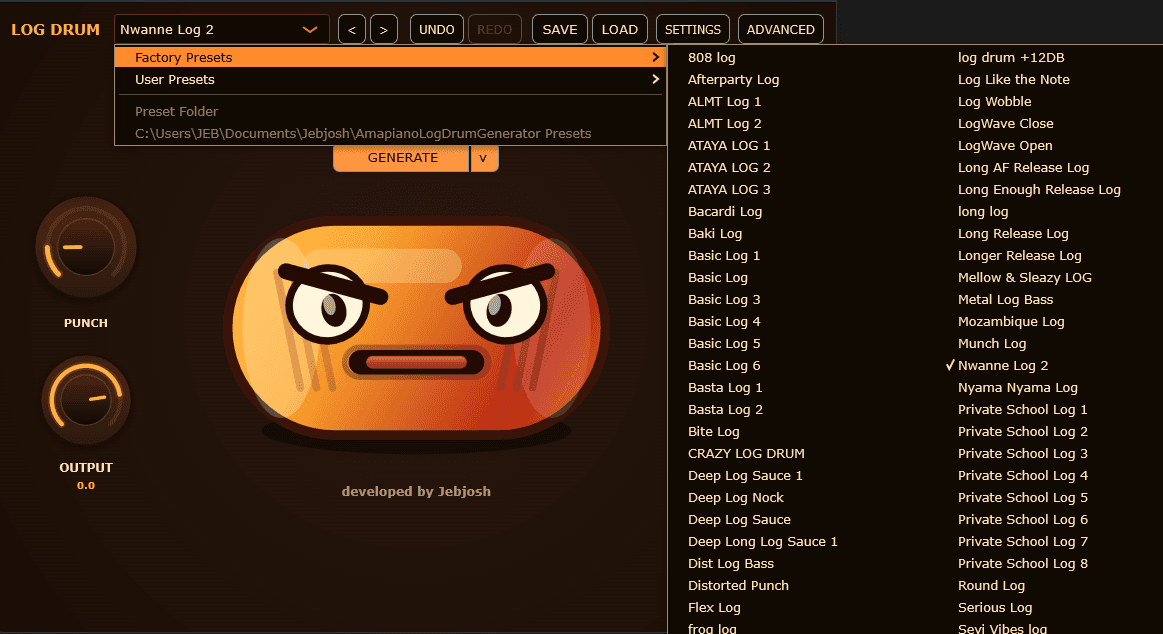
Amapiano Log Drum Generator
Log drum VST · Current version 1.0.2 · $15
Open product pageFL Studio workflow tips
FL Studio is strong for piano roll rhythm, slides, and quick pattern building. Use the plugin as a dedicated instrument, then route it to the mixer for low-end control.
- Write syncopated MIDI patterns in the piano roll
- Route the plugin to its own mixer channel
- Use EQ and sidechain to keep the kick and log drum from fighting
When to use JEBFM1 in FL Studio
Use JEBFM1 when you want deeper FM sound design, not only log drums. It can cover basses, plucks, glide tones, and metallic sounds for fuller Amapiano production.
- Log Drum Generator for speed
- JEBFM1 for broader synth sounds
- Bundle for both workflows
- Install the VST3, then rescan plugins in FL Studio Plugin Manager.
- Load the plugin in the Channel Rack and write notes in the piano roll.
- Use mixer routing for sidechain, EQ, saturation, and low-end control.
amapiano log drum vst for fl studiolog drum vst for fl studiofl studio log drum pluginamapiano vst for fl studiofl studio amapiano pluginvst3 log drum fl studio
FAQ
Quick answers for this search.
Does FL Studio support VST3?
Yes. FL Studio supports VST3 plugins, which is the recommended format for this workflow.
Can I use it with FL Studio piano roll?
Yes. Load the plugin as an instrument and write log drum lines with MIDI in the piano roll.
Is the plugin only for FL Studio?
No. It also works in other DAWs that support VST3 or AU.
More guides
All producer guides More Amapiano VST searches.
Jebjosh Plugins
Need the full Amapiano plugin setup?
Compare JEBFM1, Amapiano Log Drum Generator, the two-plugin bundle, and DX10 Free on the main page.